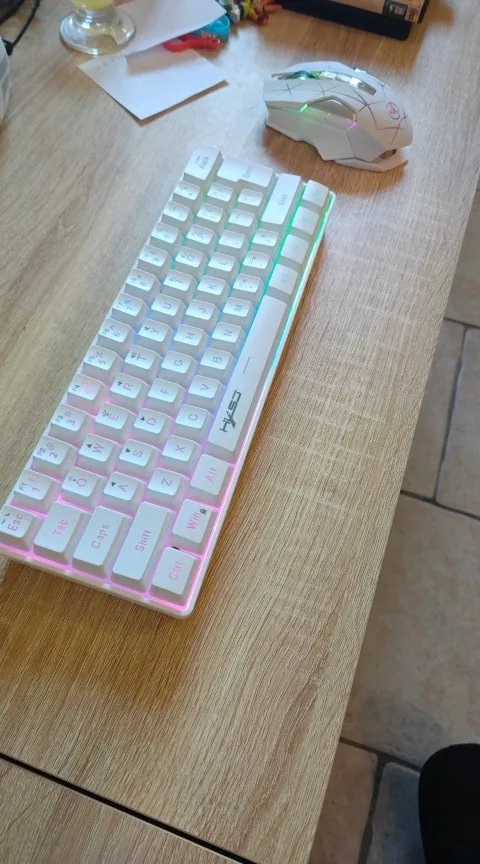
60% Wireless Gaming Keyboard and Mouse Combo, RGB Backlit Quiet Ergonomic Mechanical Feeling Keyboard, Gaming Mouse for Desktop

60% Wireless Gaming Keyboard and Mouse Combo, RGB Backlit Quiet Ergonomic Mechanical Feeling Keyboard, Gaming Mouse for Desktop

L500(T20W)
$69.99
Sale price  $69.99 Regular price 
Skip to product information
60% Wireless Gaming Keyboard and Mouse Combo, RGB Backlit Quiet Ergonomic Mechanical Feeling Keyboard, Gaming Mouse for Desktop

60% Wireless Gaming Keyboard and Mouse Combo, RGB Backlit Quiet Ergonomic Mechanical Feeling Keyboard, Gaming Mouse for Desktop

$69.99
Sale price  $69.99 Regular price 
Color

The HXSJ L500 is a compact 61‑key gaming keyboard built for players who want speed, flexibility, and multi‑device control. Featuring Wired + Bluetooth 5.0 + 2.4G wireless connectivity, vibrant RGB lighting, and a long‑lasting 2000mAh rechargeable battery, this keyboard delivers performance whether you're gaming, working, or multitasking across devices.

Designed with an ergonomic layout, durable ABS keycaps, and advanced FN shortcuts, the L500 gives you full control in a minimalist footprint.


✨ Key Features

Triple‑Mode Connectivity

  • Wired Mode – Stable USB Type‑C connection

  • Bluetooth 5.0 – Connect up to 3 devices

  • 2.4G Wireless – Low‑latency gaming performance

Switch instantly using FN shortcuts.


Compact 61‑Key Layout

  • Saves desk space

  • Ideal for gaming setups

  • Fast, efficient key placement


RGB Lighting Effects

  • Multiple color modes

  • Adjustable brightness

  • Breathing, static, and dynamic effects


Long‑Lasting Battery

  • 2000mAh rechargeable lithium battery

  • Smart sleep mode activates after 30 seconds of inactivity

  • Use while charging


Durable Build

  • ABS keycaps with oil‑injection radium carving

  • 10 million+ keystroke lifespan

  • Ergonomic design for long sessions


Multi‑Device Support

Connect to:

  • Phones

  • Tablets

  • Laptops

  • Desktop PCs

Switch between devices instantly.


📦 What’s Included

  • L500 Gaming Keyboard × 1

  • 2.4G USB Receiver × 1

  • 1.7m Type‑C Charging Cable × 1

  • English User Manual × 1


📐 Specifications

Keyboard

  • Model: L500 Compact Membrane Keyboard

  • Keys: 61

  • Connection: Wired + BT5.0 + 2.4G

  • Interface: USB‑C

  • Battery: 2000mAh

  • Lighting: RGB multi‑mode

  • Keycap Material: ABS

  • Button Life: 10 million+

  • Operating Voltage: 3.3V–4.2V

  • Working Current: 50mA max

  • Weight: 391g

  • Size: 29.2 × 10.2 × 4 cm

Packaging

  • Box Size: 32 × 13 × 4.5 cm

  • Package Weight: 540g


🖥️ System Compatibility

Works with:

  • Windows 98SE/Me/2000/XP/Vista/7/10/11

  • Mac OS

  • Linux


🎮 FN Shortcut Guide

Lighting Controls

  • FN + {[ = Light ON/OFF

  • FN + ]} = Switch 8 colors

  • FN + \| = RGB mode switch

  • FN + >. = Brightness +

  • FN + .< = Brightness –

  • FN + :; = Slow breathing

  • FN + '" = Fast breathing

Connection Switching

  • FN + Q = 2.4G

  • FN + I = BT1

  • FN + O = BT2

  • FN + P = BT3

  • FN + E = Wired

Other Controls

  • FN + W = Toggle arrow keys

  • FN + R/T/Y = Volume – / + / Mute

  • FN + Win = Lock Windows key

  • FN + Backspace = Delete

  • FN + Number Row = F1–F12


🔌 Connection Instructions

Bluetooth

  1. Turn keyboard switch ON

  2. Press FN + I/O/P to enter BT pairing

  3. Select BT name on your device

  4. LED stops flashing when connected

2.4G Wireless

  1. Turn switch ON

  2. Press FN + Q

  3. Insert receiver

  4. LED stops flashing

Wired Mode

  1. Turn switch OFF

  2. Press FN + E

  3. Connect Type‑C cable


💡 Power & Charging

  • Auto sleep after 30 seconds

  • Red LED = charging

  • LED off = fully charged

  • Low battery indicator flashes

  • Full charge in ~2 hours (5V/1A)

  • Can be used while charging

    The HXSJ L500 is a compact 61‑key gaming keyboard built for players who want speed, flexibility, and multi‑device control. Featuring Wired + Bluetooth 5.0 + 2.4G wireless connectivity, vibrant RGB lighting, and a long‑lasting 2000mAh rechargeable battery, this keyboard delivers performance whether you're gaming, working, or multitasking across devices.

    Designed with an ergonomic layout, durable ABS keycaps, and advanced FN shortcuts, the L500 gives you full control in a minimalist footprint.


    ✨ Key Features

    Triple‑Mode Connectivity

    • Wired Mode – Stable USB Type‑C connection

    • Bluetooth 5.0 – Connect up to 3 devices

    • 2.4G Wireless – Low‑latency gaming performance

    Switch instantly using FN shortcuts.


    Compact 61‑Key Layout

    • Saves desk space

    • Ideal for gaming setups

    • Fast, efficient key placement


    RGB Lighting Effects

    • Multiple color modes

    • Adjustable brightness

    • Breathing, static, and dynamic effects


    Long‑Lasting Battery

    • 2000mAh rechargeable lithium battery

    • Smart sleep mode activates after 30 seconds of inactivity

    • Use while charging


    Durable Build

    • ABS keycaps with oil‑injection radium carving

    • 10 million+ keystroke lifespan

    • Ergonomic design for long sessions


    Multi‑Device Support

    Connect to:

    • Phones

    • Tablets

    • Laptops

    • Desktop PCs

    Switch between devices instantly.


    📦 What’s Included

    • L500 Gaming Keyboard × 1

    • 2.4G USB Receiver × 1

    • 1.7m Type‑C Charging Cable × 1

    • English User Manual × 1


    📐 Specifications

    Keyboard

    • Model: L500 Compact Membrane Keyboard

    • Keys: 61

    • Connection: Wired + BT5.0 + 2.4G

    • Interface: USB‑C

    • Battery: 2000mAh

    • Lighting: RGB multi‑mode

    • Keycap Material: ABS

    • Button Life: 10 million+

    • Operating Voltage: 3.3V–4.2V

    • Working Current: 50mA max

    • Weight: 391g

    • Size: 29.2 × 10.2 × 4 cm

    Packaging

    • Box Size: 32 × 13 × 4.5 cm

    • Package Weight: 540g


    🖥️ System Compatibility

    Works with:

    • Windows 98SE/Me/2000/XP/Vista/7/10/11

    • Mac OS

    • Linux


    🎮 FN Shortcut Guide

    Lighting Controls

    • FN + {[ = Light ON/OFF

    • FN + ]} = Switch 8 colors

    • FN + \| = RGB mode switch

    • FN + >. = Brightness +

    • FN + .< = Brightness –

    • FN + :; = Slow breathing

    • FN + '" = Fast breathing

    Connection Switching

    • FN + Q = 2.4G

    • FN + I = BT1

    • FN + O = BT2

    • FN + P = BT3

    • FN + E = Wired

    Other Controls

    • FN + W = Toggle arrow keys

    • FN + R/T/Y = Volume – / + / Mute

    • FN + Win = Lock Windows key

    • FN + Backspace = Delete

    • FN + Number Row = F1–F12


    🔌 Connection Instructions

    Bluetooth

    1. Turn keyboard switch ON

    2. Press FN + I/O/P to enter BT pairing

    3. Select BT name on your device

    4. LED stops flashing when connected

    2.4G Wireless

    1. Turn switch ON

    2. Press FN + Q

    3. Insert receiver

    4. LED stops flashing

    Wired Mode

    1. Turn switch OFF

    2. Press FN + E

    3. Connect Type‑C cable


    💡 Power & Charging

    • Auto sleep after 30 seconds

    • Red LED = charging

    • LED off = fully charged

    • Low battery indicator flashes

    • Full charge in ~2 hours (5V/1A)

    • Can be used while charging

      The HXSJ L500 is a compact 61‑key gaming keyboard built for players who want speed, flexibility, and multi‑device control. Featuring Wired + Bluetooth 5.0 + 2.4G wireless connectivity, vibrant RGB lighting, and a long‑lasting 2000mAh rechargeable battery, this keyboard delivers performance whether you're gaming, working, or multitasking across devices.

      Designed with an ergonomic layout, durable ABS keycaps, and advanced FN shortcuts, the L500 gives you full control in a minimalist footprint.


      ✨ Key Features

      Triple‑Mode Connectivity

      • Wired Mode – Stable USB Type‑C connection

      • Bluetooth 5.0 – Connect up to 3 devices

      • 2.4G Wireless – Low‑latency gaming performance

      Switch instantly using FN shortcuts.


      Compact 61‑Key Layout

      • Saves desk space

      • Ideal for gaming setups

      • Fast, efficient key placement


      RGB Lighting Effects

      • Multiple color modes

      • Adjustable brightness

      • Breathing, static, and dynamic effects


      Long‑Lasting Battery

      • 2000mAh rechargeable lithium battery

      • Smart sleep mode activates after 30 seconds of inactivity

      • Use while charging


      Durable Build

      • ABS keycaps with oil‑injection radium carving

      • 10 million+ keystroke lifespan

      • Ergonomic design for long sessions


      Multi‑Device Support

      Connect to:

      • Phones

      • Tablets

      • Laptops

      • Desktop PCs

      Switch between devices instantly.


      📦 What’s Included

      • L500 Gaming Keyboard × 1

      • 2.4G USB Receiver × 1

      • 1.7m Type‑C Charging Cable × 1

      • English User Manual × 1


      📐 Specifications

      Keyboard

      • Model: L500 Compact Membrane Keyboard

      • Keys: 61

      • Connection: Wired + BT5.0 + 2.4G

      • Interface: USB‑C

      • Battery: 2000mAh

      • Lighting: RGB multi‑mode

      • Keycap Material: ABS

      • Button Life: 10 million+

      • Operating Voltage: 3.3V–4.2V

      • Working Current: 50mA max

      • Weight: 391g

      • Size: 29.2 × 10.2 × 4 cm

      Packaging

      • Box Size: 32 × 13 × 4.5 cm

      • Package Weight: 540g


      🖥️ System Compatibility

      Works with:

      • Windows 98SE/Me/2000/XP/Vista/7/10/11

      • Mac OS

      • Linux


      🎮 FN Shortcut Guide

      Lighting Controls

      • FN + {[ = Light ON/OFF

      • FN + ]} = Switch 8 colors

      • FN + \| = RGB mode switch

      • FN + >. = Brightness +

      • FN + .< = Brightness –

      • FN + :; = Slow breathing

      • FN + '" = Fast breathing

      Connection Switching

      • FN + Q = 2.4G

      • FN + I = BT1

      • FN + O = BT2

      • FN + P = BT3

      • FN + E = Wired

      Other Controls

      • FN + W = Toggle arrow keys

      • FN + R/T/Y = Volume – / + / Mute

      • FN + Win = Lock Windows key

      • FN + Backspace = Delete

      • FN + Number Row = F1–F12


      🔌 Connection Instructions

      Bluetooth

      1. Turn keyboard switch ON

      2. Press FN + I/O/P to enter BT pairing

      3. Select BT name on your device

      4. LED stops flashing when connected

      2.4G Wireless

      1. Turn switch ON

      2. Press FN + Q

      3. Insert receiver

      4. LED stops flashing

      Wired Mode

      1. Turn switch OFF

      2. Press FN + E

      3. Connect Type‑C cable


      💡 Power & Charging

      • Auto sleep after 30 seconds

      • Red LED = charging

      • LED off = fully charged

      • Low battery indicator flashes

      • Full charge in ~2 hours (5V/1A)

      • Can be used while charging

        The HXSJ L500 is a compact 61‑key gaming keyboard built for players who want speed, flexibility, and multi‑device control. Featuring Wired + Bluetooth 5.0 + 2.4G wireless connectivity, vibrant RGB lighting, and a long‑lasting 2000mAh rechargeable battery, this keyboard delivers performance whether you're gaming, working, or multitasking across devices.

        Designed with an ergonomic layout, durable ABS keycaps, and advanced FN shortcuts, the L500 gives you full control in a minimalist footprint.


        ✨ Key Features

        Triple‑Mode Connectivity

        • Wired Mode – Stable USB Type‑C connection

        • Bluetooth 5.0 – Connect up to 3 devices

        • 2.4G Wireless – Low‑latency gaming performance

        Switch instantly using FN shortcuts.


        Compact 61‑Key Layout

        • Saves desk space

        • Ideal for gaming setups

        • Fast, efficient key placement


        RGB Lighting Effects

        • Multiple color modes

        • Adjustable brightness

        • Breathing, static, and dynamic effects


        Long‑Lasting Battery

        • 2000mAh rechargeable lithium battery

        • Smart sleep mode activates after 30 seconds of inactivity

        • Use while charging


        Durable Build

        • ABS keycaps with oil‑injection radium carving

        • 10 million+ keystroke lifespan

        • Ergonomic design for long sessions


        Multi‑Device Support

        Connect to:

        • Phones

        • Tablets

        • Laptops

        • Desktop PCs

        Switch between devices instantly.


        📦 What’s Included

        • L500 Gaming Keyboard × 1

        • 2.4G USB Receiver × 1

        • 1.7m Type‑C Charging Cable × 1

        • English User Manual × 1


        📐 Specifications

        Keyboard

        • Model: L500 Compact Membrane Keyboard

        • Keys: 61

        • Connection: Wired + BT5.0 + 2.4G

        • Interface: USB‑C

        • Battery: 2000mAh

        • Lighting: RGB multi‑mode

        • Keycap Material: ABS

        • Button Life: 10 million+

        • Operating Voltage: 3.3V–4.2V

        • Working Current: 50mA max

        • Weight: 391g

        • Size: 29.2 × 10.2 × 4 cm

        Packaging

        • Box Size: 32 × 13 × 4.5 cm

        • Package Weight: 540g


        🖥️ System Compatibility

        Works with:

        • Windows 98SE/Me/2000/XP/Vista/7/10/11

        • Mac OS

        • Linux


        🎮 FN Shortcut Guide

        Lighting Controls

        • FN + {[ = Light ON/OFF

        • FN + ]} = Switch 8 colors

        • FN + \| = RGB mode switch

        • FN + >. = Brightness +

        • FN + .< = Brightness –

        • FN + :; = Slow breathing

        • FN + '" = Fast breathing

        Connection Switching

        • FN + Q = 2.4G

        • FN + I = BT1

        • FN + O = BT2

        • FN + P = BT3

        • FN + E = Wired

        Other Controls

        • FN + W = Toggle arrow keys

        • FN + R/T/Y = Volume – / + / Mute

        • FN + Win = Lock Windows key

        • FN + Backspace = Delete

        • FN + Number Row = F1–F12


        🔌 Connection Instructions

        Bluetooth

        1. Turn keyboard switch ON

        2. Press FN + I/O/P to enter BT pairing

        3. Select BT name on your device

        4. LED stops flashing when connected

        2.4G Wireless

        1. Turn switch ON

        2. Press FN + Q

        3. Insert receiver

        4. LED stops flashing

        Wired Mode

        1. Turn switch OFF

        2. Press FN + E

        3. Connect Type‑C cable


        💡 Power & Charging

        • Auto sleep after 30 seconds

        • Red LED = charging

        • LED off = fully charged

        • Low battery indicator flashes

        • Full charge in ~2 hours (5V/1A)

        • Can be used while charging

You may also like